Internal audits are easier when the process is structured, repeatable, and tracked in one place. The best internal audit management software helps small businesses plan audits, run checklists, capture evidence, assign corrective actions, and prove follow-up.
In this guide, you will learn what to look for and which tools fit SMB needs in 2026.
What is the best internal audit management software?
The best internal audit management software is the one your team will actually use every week, not just during audit season. For most small businesses, that means the tool must be simple for frontline users, strong for audit owners, and reliable for evidence and reporting.
A “best-in-class” internal audit tool typically helps you do five things without duct-taped spreadsheets:
- Plan audits with schedules, scopes, and recurring programs.
- Standardize execution with templates, checklists, and guided questions.
- Capture evidence like photos, files, comments, signatures, and timestamps.
- Track findings with clear severity, owners, due dates, and action plans.
- Prove closure with reminders, re-checks, and exportable reports.
What “best” means for a small business (not an enterprise)
Small businesses often need the same outcomes as large companies, but with fewer people and less time. So “best internal audit management software” for SMBs usually prioritizes:
- Speed to launch
- Can you create usable checklists this week?
- Can field teams run audits on mobile without training fatigue?
- Low admin load
- You should not spend hours compiling evidence.
- Reporting should be one click, not a weekend.
- Clear accountability
- Findings must have owners, due dates, and proof of completion.
- Flexible templates
- One business might need ISO-style audits.
- Another needs location inspections or supplier checks.
- Affordable scaling
- Pricing must grow with locations, auditors, or checklists.
- It should not jump to enterprise tiers too early.
Is internal audit software only for regulated industries?
No. Any small business can benefit because internal audits are just structured reviews of how work is done. That can include:
- Operations and process consistency
- Safety, hygiene, and site standards
- Financial controls and approvals
- IT and access controls
- Vendor and supplier compliance
- Training completion and competency checks
Even when there is no strict regulator, audits reduce “surprise problems” that hurt revenue and reputation.
Challenges in internal audit management?
Small teams often know auditing matters, but the day-to-day realities make it hard to do them consistently. The key challenge is not “doing an audit.” The challenge is running a repeatable audit program where findings are tracked and closed.
Below are the most common audit management challenges for small businesses.
Why do audits break down after a few weeks?
Most audit programs fail for predictable reasons:
- Audits feel like extra work.
- Checklists become outdated.
- Findings do not get fixed.
- Reports take too long to compile.
- Owners change, and context is lost.
When this happens, audits become reactive. Teams rush right before an inspection, customer visit, or certification.
1) Limited time and headcount
In small businesses, auditors are often also managers. That creates pressure to “just get through it,” which leads to:
- Skipped items
- Unclear notes
- Missing evidence
- Weak follow-up
The right internal audit management software reduces this by guiding users, enforcing required fields, and automating reminders.
2) Inconsistent checklists and standards
When audits are run from spreadsheets or paper forms, it is common to see:
- Different versions are floating around
- Different scoring methods per site
- Different interpretations of “pass” and “fail.”
- No proof that the same standard was applied
Audit software solves this with version-controlled templates, centralized updates, and standard scoring.
3) Poor evidence and weak audit trails
Many small businesses struggle to prove what happened during an audit:
- Photos are stored on phones
- Notes are scattered across chats
- Files live in email threads
- No timestamps, no locations, no signatures
Modern tools help by capturing evidence inside the audit record, attaching it to findings, and keeping an audit trail.
4) Findings do not get closed
This is the biggest operational pain. A finding is not useful unless it leads to a fix. Common issues include:
- No clear owner for each corrective action
- No due date or escalation
- No re-check step
- No visibility across multiple locations
Good internal audit management software turns findings into trackable tasks, then makes closure visible.
5) Reporting is slow and hard to trust
Manual reporting takes time and leads to errors:
- Re-typing notes into reports
- Manually counting repeat issues
- Using screenshots as “evidence.”
- Missing trend analysis
Audit software speeds this up with dashboards, filters, trend views, and exports.
6) Difficulty managing audits across multiple sites
Even “small” businesses can have complexity: a few outlets, sites, stores, or teams. Multi-site challenges include:
- Different risk levels by location
- Different managers per site
- No consistent schedule
- No way to compare performance fairly
A good tool lets you standardize the program while still tracking location-level accountability.
The Importance of Food Safety Software
Food safety software matters because food businesses do not just need internal audits. They need continuous proof that hygiene, temperature control, cleaning, and staff practices meet standards every day.
If your business touches food, beverages, kitchens, catering, or food handling, food safety audits are high-risk. A single lapse can cause:
- Customer illness and claims
- Brand damage and negative reviews
- Regulatory penalties or closures
- Staff retraining costs
- Supplier disruptions
How food safety software connects to internal audits
Food safety software can be thought of as a specialized form of audit management, focused on food operations. It often supports:
- HACCP checks and critical control points
- Temperature monitoring and logs
- Cleaning schedules and sanitation verification
- Allergen management checks
- Supplier and delivery inspections
- Incident reporting and corrective actions
The biggest value is consistency. It helps a small team run a strong program without relying on memory.
Why food businesses need more than a generic checklist app
Generic checklist apps can capture “yes or no” answers, but food safety often needs:
- Evidence-heavy logs (photos, signatures, timestamps)
- Non-conformance workflows (what happens after a failure)
- Corrective action tracking (owner, due date, verification)
- Audit trails (who did what, when, and why)
- Trend analysis (repeat issues, high-risk zones)
If you operate in food service, internal audit tools that support field audits, evidence capture, and corrective actions can overlap strongly with food safety needs.
Who benefits most from food safety software?
Food safety systems are especially useful for:
- Small restaurant groups with multiple outlets
- Catering teams with rotating staff
- Central kitchens and food production sites
- Franchises that need standardization
- Hospitality businesses with large kitchens
If your business is not in food, you can still learn from the food safety approach: it focuses on consistent, repeatable checks and fast corrective action.
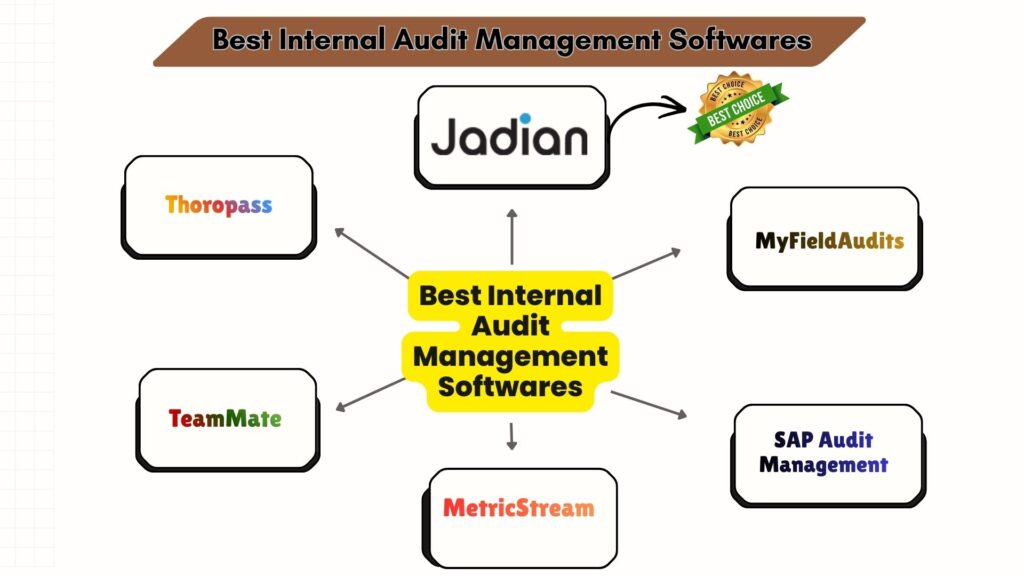
5 Best Internal Audit Management Software Solutions in 2026
The list below focuses on tools that support internal audit workflows: planning, checklists, evidence capture, findings, corrective actions, and reporting.
Quick comparison table (high-level)
| Software | Best for | Key strengths | Watch-outs |
| Jadian | SMBs that want structured audits + action tracking | Audit workflows, templates, findings, reporting, and governance-friendly | Confirm pricing and module fit for your size |
| MyFieldAudits | Field inspections and operational audits | Mobile audits, evidence capture, scheduling, and action items | Positioned strongly for inspection programs |
| SAP Audit Management | Businesses already using SAP tools | Integration with the SAP ecosystem, standardized reporting | Can feel heavy for smaller teams |
| MetricStream | GRC-focused audit and risk programs | Risk framework, issue management, visibility | May be more “enterprise” than many SMBs need |
| TeamMate (Wolters Kluwer) | More mature audit functions | Audit lifecycle support, analytics, risk-based auditing | Implementation may require more setup |
1) Jadian
Jadian is a strong option when you want internal audits to work like a real program, not an occasional project. It is designed to help teams plan audits, run them consistently, document evidence, and track corrective actions to closure.
For small businesses, Jadian stands out when there is a need for structure and governance without building everything from scratch. If you have multiple locations, repeated operational issues, or customers asking for proof of controls, Jadian can help you stay organized.
What makes Jadian a good “audit program” tool?
Jadian tends to fit teams that want:
- Standardized audit templates that do not drift over time
- A consistent workflow from planning to reporting
- Clear tracking of findings and actions
- Visibility into repeat issues, risks, and performance
- A cleaner audit trail than spreadsheets can provide
In practice, this is what helps a small business move from “we did an audit” to “we can prove we manage quality and risk.”
Key features to look for in Jadian (and how they help)
Below are the capabilities that matter most for SMB teams, explained in practical terms.
Audit planning and scheduling
- Build audit calendars so audits happen on time.
- Set recurring audits by location, department, or process.
- Scopes and goals should be defined to keep the audits on track.
Templates and standardized checklists
- Create reusable audit programs and checklists.
- Ensure every site is measured against the same standard.
- Reduce training time by guiding auditors step by step.
Evidence and audit trail
- Attach documents, notes, and supporting files.
- Keep records tied to specific audit questions and findings.
- Ease of retrieving evidence on demand.
Findings and corrective actions
- Record findings with clear severity and description.
- Assign owners and due dates to corrective actions.
- Not only report but track status until closure.
Reporting and dashboards
- Produce non-manually formatted reports.
- View recurring non-conformances and trends.
- Help managers see what needs attention this week.
Collaboration
- Keep stakeholders aligned on actions and timelines.
- Reduce back-and-forth in email threads.
- Create shared visibility across teams.
Best-fit scenarios for Jadian
Jadian is a strong fit if you are dealing with:
- Multiple locations and inconsistent execution
- Repeat audit findings that do not get resolved
- Customer or partner requests for proof of controls
- Compliance expectations that are growing
- A need to show management reporting and improvements
If your audits are mostly informal “spot checks,” you might start with a simpler inspection-first tool. If you need a more complete internal audit system, Jadian is usually more aligned.
Brief summary of Jadian
Jadian is best when your business wants a structured internal audit workflow, strong corrective action tracking, and reporting that supports accountability. It is a good choice for small businesses that are maturing their governance and want audits to drive measurable improvements.
2) MyFieldAudits
MyFieldAudits focuses heavily on making inspections and operational audits easy to run in the field. It is designed for teams that need a practical way to execute checklists, capture evidence, and manage follow-ups.
For small businesses, this is valuable because many audits happen on-site, not behind a desk. When your team can capture the reality of conditions with photos and notes, reporting becomes more credible.
Key features:
- Mobile-friendly audits and inspections
- Run audits during site visits.
- Minimise misses using directed work processes.
- Evidence capture
- Findings can be supplemented by photos and videos.
- Notes and comments provide a follow-up context.
- Scheduling and assignment
- Assign audits to the right people.
- Plan recurring site checks.
- Action item tracking
- Turn audit findings into tasks.
- Track completion and follow-up.
- Visibility and reporting
- Central reporting across audits and sites.
- Better oversight without spreadsheets.
Brief summary
MyFieldAudits is a strong option for small businesses that need operational audits and inspections to be simple, evidence-based, and trackable. It works well when execution happens in the field.
3) SAP Audit Management
SAP Audit Management is a logical option if your business already uses SAP or plans to. It is constructed in favor of formal audit, standardized documentation, as well as integration with other SAP tools.
For many small businesses, the “best” part is not the tool itself, but the ecosystem fit. If your finance, operations, or reporting is already in SAP, audit work can align better.
Key features:
- Audit workflow automation
- Structure audit steps from planning to reporting.
- Reduce repetitive manual admin.
- Issue tracking
- Track audit observations and remediation.
- Maintain a consistent follow-up flow.
- Templates and standard reports
- Standardize output across audits.
- Reduce variation across teams.
- Document management
- Store audit documentation for retrieval.
- Support evidence handling and audit trails.
- Integration with SAP applications
- Better data flow in SAP-heavy environments.
- Helps reduce duplicated work.
Brief summary
SAP Audit Management is best for teams already in the SAP ecosystem and willing to adopt a more formal audit process. It may be heavier than what some SMBs need.
4) MetricStream
MetricStream is a governance, risk, and compliance-oriented platform with strong internal audit capabilities. It is often used when audits connect closely to risk frameworks, compliance obligations, and enterprise reporting.
For small businesses, MetricStream is most relevant when there is increasing external pressure: certifications, customer audits, regulated operations, or rapid scaling.
Key features:
- Centralized risk and audit framework
- Tie audits to risk areas and controls.
- Improve audit prioritization and planning.
- Issue management
- Track issues, ownership, and remediation.
- Strengthen closure discipline.
- Automation and analytics
- Use automation to reduce manual tracking.
- Improve visibility into recurring problems.
- Collaboration tools
- Share audit status across stakeholders.
- Reduce siloed audit work.
- Time tracking and offline capability
- Useful for teams in the field or traveling.
- Supports operational audits in varied environments.
Brief summary
MetricStream is best for audit programs that are closely tied to governance and risk. It can be more than some small businesses need, but it is powerful for scaling and compliance-heavy environments.
5) TeamMate (Wolters Kluwer)
TeamMate is widely recognized in audit management and is often used by organizations that want robust audit lifecycle support. It is more likely to suit those teams that are concerned with risk-based auditing, analytics, and organized execution.
TeamMate can be a formidable solution to small businesses whose owners are committed to audits and wish to make the audits repeatable and measurable.
Key features:
- End-to-end audit lifecycle
- Planning, execution, reporting, and follow-up within a single system.
- Maintain cycle-to-cycle consistency of audit work.
- Risk-based auditing
- Audit work should prioritize risk.
- Improve decision-making and scheduling.
- Reporting and analytics
- Identify repeat issues and trends.
- Support management updates.
- Integration capabilities
- Connect with other systems depending on setup.
- Reduce duplicated documentation.
- Flexible infrastructure support
- Useful if you have specific IT constraints.
- Offers options depending on the environment.
Brief summary
TeamMate is a strong, structured solution for internal audit lifecycle management. It fits best when your audit process is maturing, and you want stronger analytics and reporting.
Read More >> Best Audit Managemet Software
Features to Consider in an Internal Audit Management Software
The right features depend on your workflow, but most SMBs should evaluate tools using the same core checklist.
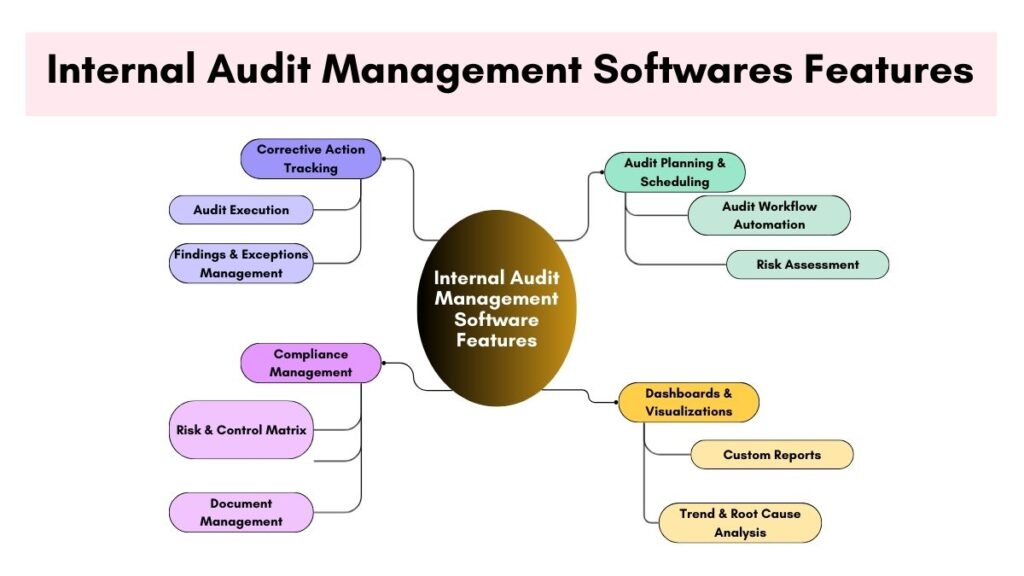
In each category below, the first couple of sentences tell you the “core takeaway” so you can decide quickly.
1) Does it support audit planning and recurring schedules?
A good system must help audits happen on time with less admin effort. Recurring schedules, reminders, and audit calendars are essential if you want a reliable program.
Look for:
- Periodic site, team, or departmental audit.
- Workload visibility and audit calendar view.
- Capability to give out auditors and backups.
- Change tracking and easy rescheduling.
2) Do you have the ease of creating and maintaining templates?
It is the templates that make audits consistent. Audits go adrift, and it is difficult to compare results without good management of templates.
Look for:
- Duplication and template library.
- Version control or explicit template updates.
- If supported, conditional questions will be used.
- Scoring and weighting alternatives.
- Fields necessary for critical evidence.
3) Is evidence capture and audit trail strong?
An audit is made out to be proof by evidence. There is also effective evidence capture that minimizes the arguments and the rework.
Look for:
- Photos, attachments, and documents.
- Time-stamped records
- Context capture and fields of comments.
- Sign off or acknowledgements where necessary.
- Easy retrieval of evidence later.
4) What does it do with findings, corrective measures, and closure?
Fixing is what provides audit value. Unless actions are on a clear track, the tool will become a box of problem storage.
Look for:
- Determination and classification of severity.
- Corrective action assignment and due dates.
- Status monitoring and notifications.
- Check or re-check workflow.
- Time repeats finding detection.
5) Is it able to generate reports that are comprehensible to the stakeholders?
The reporting must be quick and easy to read. It should not produce a pretty PDF, but actionable information.
Look for:
- Single-Click Reports and Exports.
- Site, department, risk area dashboards.
- Trend analysis and issue views.
- Date filters, severity filters, and owner filters.
- Sharing links or planned reporting (where feasible)
6) Can frontline users easily use it?
When the auditing is done by store managers, supervisors, or someone leading the site, then usability is all. A device can be effective and not work because it is not user-friendly.
Look for:
- Mobile-friendly experience
- Offline in case audits occur in bad connectivity.
- Easy navigation and minimal learning time.
- Quick form filling and saved form.
7) Does it fit with the tools you are already using?
The integrations decrease the manual input of data and enhance consistency. To the SMBs, time-saving is the most typical value, rather than sophisticated automation.
Look for:
- Document storage integrations.
- Export capability of data in useful formats.
- The availability of an API when you have some technical help.
8) What of security, access control, and permissions?
Audit records normally involve sensitive information. You must have the assurance that only the appropriate individuals can see, edit, and put the items to close.
Look for:
- Role-based permissions
- Activity monitoring and audit.
- Data retention policies
- Admin permissions on template editing.
9) Pricing and scalability
The tool must be suitable for you now and continue to serve when you expand in size. Many SMBs get trapped by pricing tiers that jump suddenly.
Look for:
- Pricing clarity: per user, per location, per audit, or per module
- Ability to start small with core needs
- Transparent costs for add-ons like reporting or integrations
How do you choose the best auditing software for your small business?
You can avoid overbuying by choosing based on workflow and constraints. Start with your real audit rhythm, then work backward.
Step-by-step selection method
- Define your audit types
- Operational audits
- Compliance audits
- Food safety checks
- Vendor audits
- Financial control audits
- List the “must-have” outcomes
- Faster audits
- Better evidence
- Faster reporting
- Closure discipline
- Decide who runs audits
- Dedicated auditor
- Managers
- Site supervisors
- Pick your rollout approach
- One location pilot
- Two-week checklist testing
- Expand after templates stabilize
- Score tools against your priorities
- Usability
- Evidence
- Corrective actions
- Reporting
- Cost
FAQs
What is the best internal audit management software for small businesses?
The best tool is the one that makes audits consistent, captures evidence, and tracks corrective actions to closure. Many small businesses prioritize usability, scheduling, and reporting. In this guide, Jadian is listed first due to its structured audit workflow support.
What is the difference between internal audit software and a checklist app?
Checklist apps collect answers. Internal audit software manages the full program: planning, evidence, findings, corrective actions, reporting, and audit trail.
How much does internal audit software cost?
Pricing varies by vendor and model. Many tools charge per user, per location, or per module. It is best to request quotes based on your audit volume and team size.
Can internal audit software replace external audits?
No. External audits are performed by independent auditors. Internal audit programs assist you in remaining ready, organizing the evidence, and correcting the problems prior to external examinations.
What are the characteristics that are important to small businesses?
The key areas that should be paid attention to by most SMBs include templates, mobile usability, evidence capture, corrective action tracking, and easy reporting. Integrations and advanced risk frameworks matter more as complexity grows.
Do food businesses need separate food safety software?
Sometimes. If you need HACCP-focused logs, temperature tracking, or sanitation verification, food safety software can be worth it. Many internal audit tools can still support food safety audits using strong templates and evidence workflows.
How quickly can a small business implement an internal audit tool?
A small team can often pilot in one to two weeks if templates are ready and the workflow is simple. Full rollout depends on locations, training, and how many audit types you standardize.