
Field service management software will remain very important to the businesses which are focused to increase operational efficiency in 2026. The business which is providing field services required this solution as controlling with manual methods is no more significant.
Customers now expect immediate updates and real-time feedback. FSM software addresses these requirements by automating technician assignment and enabling real-time field tracking.
Through extensive research, we have compiled a list of the top ten Field Service Management (FSM) solutions to help companies of all sizes save time and money while exceeding customer expectations.
What is Field Service Management Software?
Field service management software is a digital solution which helps those businesses which have field service related business and to manage field employees, their activities, scheduling job to completing job is managed by Field service management software.
In 2026, FSM software will be the lifeblood of every service-oriented business. It will replace inefficient whiteboards and misplaced paperwork with a single central repository that organizes all of the information associated with operating your mobile workforce from a single screen.
By utilizing FSM software, your office can significantly reduce the amount of time spent continuously calling into the office to inquire about the status of a given job.
It has three primary components:
- Central Dashboard: This gives you an overall picture of all jobs in progress as well as a snapshot of where your technicians are located at any time.
- Mobile App: The technician would use the mobile app to view and manage their work orders, upload and save photos of completed job tasks, and obtain customer signatures for jobs they have completed while in the field.
- Customer Portal: This system helps your clients to schedule appointments and they can also check after how much time technicians will visit them to resolve their problem.
- Automated Invoicing: The FSMS generates an invoice as soon as a technician completes their work and sends it directly to the client.
Why Does Your Business Need FSM Software?
Utilization of FSM Software can take away the daily stress of manually and using paper to schedule and record your work. Using digital solutions to automate complicated processes makes simple yet extremely efficient processes that keep people organized and clients happy.
- Quick Response: Your manager can check the nearest technician available to the client which has a complaint. This will help you to save time and also reduce the fuel cost, this will help you to achieve customer satisfaction.
- Reduce Paper Work Using Digital Forms: The record which is managed by papers has a chance to be lost, but using digital forms you can manage paperless records of client records, customer history and notes.
- Access to Employee Data: This will help you to manage employees and improve the work efficiency because you can track the location of every technician at this time which job he is completing. This helps the managers to access the schedules and inform clients about the arrival updates.
- Improve Business Growth: As this software helps you to manage all the field employees smoothly so it improves the work efficiency and business growth. This will help you to manage a large number of field employees by removing the paperwork.
Which are the 10 Best Field Service Management Software Solutions for 2026?
When you’re selecting the best field service management software for small business in 2026, you must check the top options available in the market and compare those to select the best option according to your business requirements.
The following 10 Software Solutions will provide users with the best way to maximize their field operations while meeting safety standards.
1. Jadian Software
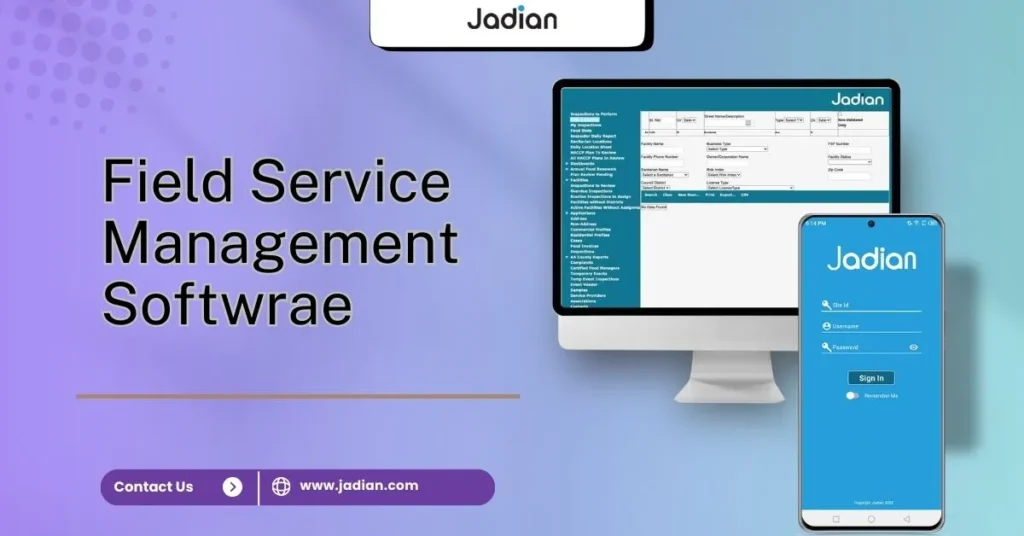
Jadian field service management software has established itself as the best option available for a comprehensive solution for compliance and safety inspections. It’s the ideal software for customers to manage complex inspection processes. Jadian is designed to accommodate the various challenges associated with working in the field and provides flexible access to information, regardless of whether the technician is connected to the Internet.
- Custom Forms for Inspections: By using Jadian software you can build your own digital forms which match your business safety protocols and regulatory controls.
- Advanced Tracking of Compliance: It automatically tracks the regulatory compliance like IOS and other regulatory compliance can be managed with Jadian software .
- Offline Mobile Access: Employees can access offline it means they can complete the inspection process even if there is no mobile data available.
- Corrective Action Plans: In the case that an inspection does not pass, Jadian Software automatically creates tasks for the technician to follow up on.
- Analysis of Safety Trends: Access to live data and analytics on all of your different job location safety trends.
- Streamlined Dispatch: The robust audit function of Jadian combines with an easy-to-use, drag-and-drop office scheduling board.
- Instantaneous Safety Reports: As soon as a technician has completed an inspection, the software generates a professional safety report.
2. Microsoft Dynamics 365
The field service software of Microsoft Dynamics 365 is designed specifically for organizations that use Office 365. It requires high-performance AI capabilities to proactively predict when a piece of equipment will break down prior to a failure.
It is designed to work seamlessly with the entire organization. The data from the Field Service Module is combined directly with Sales and Finance data and provides a single view into all parts of the organization.
- Predictive Maintenance – A machine or an asset has sensors that send data to the predictive maintenance module and automatically alert the system when a service request is needed.
- Remote Expert Assistance – Technicians can utilize AR software to connect to remote experts, who assist them with repairs.
- Seamless Outlook Integration – Use Outlook to quickly create work orders and schedule tech visits.
- Data Summaries – Benefit from summaries of long activity history to make it easier to review past service requests.
3. Salesforce Field Service
Salesforce is the best choice for any type of business that has a strong emphasis on delivering great client experiences. It is best known for its “Customer 360” concept, where everyone in your organization has access to the same data about a client.
The technicians who arrive at the job site have immediate access to what the client has discussed with the sales staff prior to the technician’s arrival.
- AI-Based Dispatching: Salesforce uses Einstein AI technology to determine which technician will be the best fit for the assigned service call based on their skill set.
- Appointment Booking Portals: Clients have access to a professional-looking, branded web portal that offers them the ability to schedule their own appointment times.
- Mobile-Based Knowledge Library: Technicians have immediate access to repair manuals and instructional videos directly through their mobile app.
- Visual Remote Assistant: Technicians can utilise live video technology to assist clients with troubleshooting their issues without the need for a technician truck to be sent.
4. Wello
Wello is designed to provide fast, simple solutions for companies that require a professional team’s capability, while maintaining speed and ease of use so that technicians can be online and working right away.
With a majority of FSM solutions being overly complicated and requiring months to learn, Wello has taken an entirely different approach to building its system to look and feel like an easy-to-use mobile app, which is a huge benefit for those companies that are transitioning from paper to a digital format.
- Technician-Driven Workflows: Wello’s app will guide your field personnel through every stage of their jobs to minimize their chance of making mistakes.
- One-Week Implementation: Wello enables you to implement the entire workforce on the system within 7 days.
- Rapid Job Set-Up: The new work order feature on the dashboard allows you to create a job with just a few clicks and complete the setup within seconds.
- Direct Communication: Office employees can send instant messages to the field personnel without having to leave the platform.
5. Jobber
Jobber is an optimal solution for residential service professionals in the landscaping, cleaning, and painting industries. Its goal is to allow owners of these types of enterprises to work smarter by streamlining the billing and scheduling processes.
This Field service management software for small businesses helps to present a much larger and more professional image by removing the majority of the mundane administrative functions. Jobber’s superior feature is that it allows you to be paid faster by your customers.
- Simplified Invoice Creation and Sending: Jobber allows you to quickly send customers an automated invoice once you complete a job by either text or email.
- Automated Customer Text Alerts: By using the automated text message feature, you can send “on the way” and appointment reminder texts to your clients, making them feel appreciated.
- Drag-and-Drop Scheduling Calendar: Drag-and-drop scheduling allows you to quickly rearrange appointments on your visual calendar to make the most efficient use of your time.
- Online Lead Capture: Jobber allows you to easily capture service leads through your company website and/or social media pages.
6. ServiceTitan
The ServiceTitan software suite is an example of an all-inclusive solution for contractors in both residential and commercial industries, such as HVAC, Plumbing, and Electrical. It offers a complete suite of tools to operate a busy dispatch center as well as track the daily revenue generated by your company.
The unique aspect of this software is that it was created by individuals who grew up in the service trades. ServiceTitan provides more extensive financial reporting capabilities than most other software platforms on the market today.
- Call Center Integration: When you receive a telephone call from a customer, your dispatchers can view the entire history of that customer before answering the phone.
- Pricebook Management: You can quickly and easily adjust your pricing for your services throughout the entire company in just a couple of mouse clicks.
- Job Costing: You can quickly find out how much profit you made on each job you completed while working on it.
- Marketing Pro: The marketing tool enables users to identify which of their marketing advertisements have yielded the highest volume of profitable service calls to date.
7. Workever
Workever is an easy-to-use software for trade businesses with up to 75 employees. The user interface is intuitive and doesn’t require an extensive amount of training.
It focuses on the “essential” parts of your operation and automates all processes so employees can easily move from job to job without stopping to navigate complicated menus or go through lengthy procedures.
- Instant Job Updates: The technicians know the status of their current job the instant they touch their phone screen.
- Automated Customer SMS: By giving your customers automatic reminders the day before the appointment, you’ll be able to decrease “no-shows.”
- Easy Document Storage: If your team needs to quickly review a work order when they arrive on-site, you have the option to attach photos, sketches, and PDF manuals directly to that specific work order.
- One-Day Onboarding: Most teams can train on the Workever System in less than one day.
8. Field Promax
It is designed to assist small-scale organizations that need to automate administrative processes, including keeping accounting records accurately. It has been developed to integrate with QuickBooks, thus guaranteeing a high level of accuracy in accounting.
Many companies that operate in a “field” environment face problems from the “double-entry” process. Double-entry occurs when a technician enters the same information into both the scheduling system and the accounting system. Through the use of Field Promax, this problem can now be solved by automatically synchronizing all of your records.
- AI Technician Matching: Field Promax utilizes AI technology to recommend the “best qualified” technician based upon their geographical proximity to the job site.
- Live Match Views: The software provides users with a real-time map view that allows them to track the location of their vans, enabling customers to receive updates regarding when they will arrive at their destination.
- Direct QuickBooks Sync: Field Promax enables users to keep their QuickBooks account updated in real-time for invoices, payment records, and customer information.
- Time Tracking: Field Promax enables technicians to use their mobile device to record their time and be paid accurately.
9. ServiceMax
ServiceMax is developed by PTC and was made to optimize the long-term servicing and performance of heavy-duty machinery, such as hospital devices or factory robots. It focuses on companies’ most valuable assets and provides an organized approach to maintaining these assets in great condition through an asset-centric view.
The software monitors every service performed on equipment, including repairs made, parts replaced, and all inspections conducted, throughout the equipment’s entire lifetime. Keeping accurate records over time allows organizations to discover smaller issues before they escalate into larger problems.
- Equipment Hierarchy Tracking: Through this software, you are able to manage complicated machinery that has thousands of parts and sub-systems.
- Warranty Automation: It will automatically check warranty information before submitting billing for any type of repair work.
- Predictive Service: With predictive service, ServiceMax allows you to use historical data on your machines to predict when your machines will fail within a specified timeframe.
- Contract Management: It provides the ability to track a company’s most significant and complex service contracts for its largest and most important corporate clients.
10. SAP Field Service Management
SAP FSM is the most popular solution for large global enterprises that have many technicians working in various locations. It allows organizations to easily manage and control their field employees across various time zones, countries, and languages.
SAP FSM is part of the SAP ecosystem, which means it is designed with scalability in mind, so an organization can scale its operations as needed without negatively impacting performance or losing data.
If your organization currently has other SAP applications, such as finance or supply chain, using SAP FSM is the next logical step.
- Resource Prediction: Historical data is used to project the number of technicians required next month.
- Self-Service AI: Customers can use a chatbot for troubleshooting minor problems, reducing the need to contact a technician for assistance.
- Multi-Location: An organization can manage all of its offices and/or locations from one global dashboard.
- Deep Integration with ERP: All field service jobs are integrated into your organization’s inventory and financial reporting system.
What Features Should You Look For in FSM Software?
Selecting an FSM solution for your team is a significant investment. Therefore, you should choose solutions that will save you time and eliminate daily frustrations. Look for automation solutions that handle the most complex aspects of the service workflow.
- Intelligent Scheduling – It should automatically route technicians based on their skills to ensure optimal service delivery.
- Remote Functionality – Ensure the application provides complete functionality to technicians in basements or other areas where a cellular signal does not exist.
- Real-Time Inventory – The FSM software should allow you access to an inventory of parts and tools located within your service vehicle, and to what is available at any given time.
- Easy Integration – It should be able to seamlessly connect to your current accounting systems, such as QuickBooks or Xero.
What are the Benefits of Field Service Management Software?
FSM software will not only increase your profit but also portray a more professional image for your business. In addition, it gives you the ability to do more jobs per day while spending less time on administrative tasks.
Today’s software ensures your customers have a consistent, high-quality experience with your business. When your team works together well and is organized, your customers feel comfortable with the service you provide.
- Lower Fuel Costs: With intelligent route optimization, technicians will drive less distance between jobs, providing substantial savings on fuel costs and reducing wear and tear on vehicles.
- Faster Cash Flow: Technicians can send out invoices from the field and receive payment right away, creating a much quicker cash flow than waiting for a check to arrive in the mail.
- Happier Staff: Your field crews will have direct access to the information they need to perform their jobs without contacting the office for updates. This reduces their stress levels and allows them to concentrate on doing quality craftsmanship.
- Sustainability: Going paperless is a more environmentally friendly approach to business, and it will save money on office supplies. Furthermore, digital documents can be more easily organized, stored securely, and searched for when needed.
10 Best Field Service Management Software: Why Jadian Leads the Pack
The right software will keep your organization profitable and safe in 2026, so selecting the best FSM solution is crucial. Jadian stands out as the premier solution for compliance and technician efficiency.
The key to success is utilizing the best digital tools for organizing workflow and making your company competitive. Digital solution provides employees on-site with the opportunity to perform what they do best while spending less time on tedious paperwork. If your organization prioritizes safety, Jadian is still our top choice due to its superior auditing features and ability to work offline.
Investing in your Field Service Management software today will prepare you for future workforce demands. By upgrading from old-fashioned “manual” processing methods, you will achieve positive results quickly and provide an outstanding customer experience.

Contact our team today to explore your options!
Read More >> Guide of the Top 10 Food Safety Software in 2026
FREQUENTLY ASKED QUESTIONS:
Is it possible to use the Jadian software for non-safety-related activities?
Yes, although Jadian is primarily focused on being an industry leader in audits and FSM Software, it is not limited to just safety. It can also be utilized for scheduling, dispatching, and work order management within any service sector.
Will Jadian and Jobber have mobile applications on both iPhone and Android devices?
Almost every current FSM application has an app on the Apple App Store or Google Play Store, including Jadian as well as Jobber.
How long does it take to install an FSM Software program?
For simple tools like Workever, installation may take less than 24 hours. For Enterprise-level solutions like Jadian and SAP, it could take from 1 to 6 weeks to develop a fully customizable system.
What will happen to my data if I’m in the field without Internet access?
The leading vendors of FSM software, including Jadian, offer an “offline sync” option. This allows users to save their information on their device and, when an Internet connection becomes available, upload the data.