Let’s face it spreadsheets and other manual systems are no longer working in terms of tracking and ensuring compliance. Suffice it to say, it is no longer practical. Given this, certification management software has become a key tool for organizations.
Certification software, on its own, helps businesses lower compliance risks. It also increases transparency and ensures employees, partners, or customers stay certified. This software keeps organizations organized and audit-ready, whether it’s for staff qualifications, training programs, or professional credentials.
This guide outlines the top five choices in the industry, helping you find the best one for your growing organization.
What Is Certification Management Software and How Does It Work?
Certification management software is a digital tool that helps organizations handle every step of the certification process. Businesses can use it to keep track of certifications for employees, vendors, or partners in one secure location. With this, organizations can keep records accurate and up-to-date. As a result, this helps them prove compliance during audits and reviews.
The certification management software is unique as it can automate numerous tasks. Automation simplifies work; it is time-consuming when done manually. It provides features such as reminders, status tracking, workflow approvals, and real-time reports, which reduce manual work and errors.
This way, teams work more efficiently, avoid missing renewals, and spend more time on important tasks. The software also enables organizations to maintain accuracy, organization, and compliance.
Key Components of the System
The system has the following essential components:
User Dashboards
User dashboards let you view certification statuses, expirations, and other requirements all in one spot. Company managers and administrators can also keep track of their team’s compliance here. Moreover, you can easily see certificates, track application progress, and check renewal deadlines on your dashboards.
Workflow Automation
Workflow automation as a component automatically handles routine tasks such as approvals, renewals, and issuing certificates. Through this, a certificate management software makes certification procedures simple and easy, thereby reducing administrative work.
Document and Record Storage
Storage is one of the most essential aspects in an office setting. This is especially true for valuable documents like certifications.
As such, it is important for companies to store their certificates and other important documents together in a secure location. Most accreditation management software contains tools that keep track of changes and limit who can see or change information. In return, these features help protect private information and keep data safe and correct.
Reporting and Compliance Tracking
Tracking work manually on spreadsheets simply does not work these days anymore. What’s more, reporting on application status is made even more difficult.
Thankfully, compliance software has reporting tools that help businesses follow legal requirements and prepare for audits. These tools also help managers spot problems and risks that need immediate attention. Therefore, you no longer need to make constant checks.
How the Software Works
One major advantage of certification management software is that it takes care of daily tasks. As a result, administrators get their work done faster and more efficiently. Here’s how this solution works:
Enrollment and Profile Setup
First, users sign up on the platform and receive their own profiles. Each profile keeps a record of user certifications, required tasks, and related documents. In this way, all their information is kept together in one place.
Certification Creation and Assignment
This software lets you easily set up certification programs in the platform. You can do this by simply selecting specific requirements and assigning teams for such. In turn, the software ensures that consistent issuance of certifications, following company policies and regulatory standards.
Tracking Expirations and Renewals
Say goodbye to manual monitoring of expirations and renewals. The system does it for you.
It keeps track of when certifications are still good and when they need to be renewed. With accreditation management software, you can easily see when certifications expire and the deadlines for their renewal. This helps you keep up with important dates.
Alerts and Notifications
This feature is particularly useful, in case you are forgetful. Automated notifications and alerts have messages that remind people of what to do. The administrators and the users are reminded of the tasks or approvals in a fast manner, and no work is left incomplete.
The software certification management is used to maintain and centralize the tracking of certifications. Due to its distinctive features, such as transparent dashboards, automated processes, safe storage of documents, and real-time compliance verification, it is very easy to enhance compliance in any location. The software, therefore, reduces the administrative burden in all departments.
How Does Certification Management Software Improve Compliance?
Automated software, with all its amazing features, makes it easier for companies and their employees to work efficiently. There are a number of benefits in line, but compliance is its number one priority.
If you are unsure, here is how certification software helps maintain compliance:
Centralized Record Keeping
All certification records, documents, and supporting evidence are stored securely in one system. This prevents scattered files, data inconsistencies, and issues common with manual tracking.
Consistent documentation and audit-ready reporting really help in the office, especially if it’s automated. Through this, organizations can easily demonstrate compliance in case of internal reviews, audits, and inspections.
Automated Reminders and Alerts
A short horror story: forgetting to renew and letting certifications run out.
The automation of the software will be able to follow the expiry date and remind the user of upcoming deadlines, thus they can renew their certifications before the set deadline without panic. As a result, operations keep running smoothly, rule violations are prevented, and fines are avoided.
Standardized Processes Across Teams
The program helps simplify the process of issuing, approving, and renewing certifications. Automating these steps ensures that all teams follow the same compliance standards, no matter where they are. Accordingly, this approach helps reduce mistakes and boosts accountability across the company.
Real-Time Monitoring and Reporting
Real-time monitoring and reporting are impossible in spreadsheets and take up too much of your time.
The real-time dashboards or reports allow viewing compliance status in real-time, and notify managers of expired certifications promptly. Besides, risks and non-conforming areas are pointed out in the system, and proper data and recent updates make the preparation of the audit and control of the risks easy.
Generally speaking, the software maintains compliance in organizations by keeping records in a centralized manner, sending timely notifications, and implementing standard procedures. A secure system ensures that certifications are up to date and that day-to-day operations are running well.
A good system keeps certifications in real time and helps everything run smoothly on a day-to-day basis. As such, certification management software is key to ensuring compliance in your business.
What Features Should You Look for in Certification Management Software?
The quality of features in a software speaks volumes about the kind of system it implements. It is very important to keep this in mind. If you’re choosing accreditation management software for your team, make sure to check for these important features.
Core Features
The core features are the most critical things that enable a solution to work well. They are the pillars of a software. In short, these are the essentials that you should look for in an effective certification software.
- Certification Tracking and Renewal Alerts
A good software lets you track your certificates in real time, check their expiration dates, and handle renewals easily. The app also sends automatic email alerts and reminders to help you stay on top of things.
- Document Management
A reliable certification software helps you securely store important documents, certifications, and records. Tools such as version control, file attachments, and reusable templates help you stay organized and ready for audits.
- Automated Workflows
Automated workflows in a certification software help speed up approvals, renewals, and escalations. It reduces manual work by automatically sending tasks to the right people. In return, you can make sure that all required steps are done correctly and on time.
Advanced Features to Consider
Certification software also has advanced features that optimize the solution itself. In addition to the core features, these advanced tools improve the service to users. Here are some of them:
- Customizable Dashboards and Reports
It provides the executives and administrators with concise and direct access to essential data. They enable the user to monitor compliance patterns, identify problems, and easily create reports.
- Integration Capabilities
The platform has integration features that allow it to integrate with other systems, such as the human resource and the learning management systems. This ensures data is accurate, minimizes duplication, and ensures it is easily managed to control certifications within the organization.
- Mobile Access
The application is a necessity for using a mobile device. Certification management software that is mobile-friendly also enables managers and administrators to view certifications and upload documents at any time and irrespective of location.
This is flexible enough to allow working remotely and provide easy access to the employees whenever they may need it.
- Security and Compliance Controls
Security is a crucial issue with the increasing concerns of privacy over the internet.
When choosing certification software, look for strong security features. It should include role-based access controls, detailed audit logs, and solid encryption standards.
The features safeguard confidential certification information and provide regulatory adherence.
Ease of Use & Support
It is no longer sufficient to have complex software. Users are looking for convenient applications with useful features. The lack of complex design and stable support of the vendor allows for adapting to clean software quickly.
A good certification management software must have the following features included:
- Simple user onboarding.
- A helpful customer service desk.
- Prompt customer service
The software must have some training materials so that the teams can use it properly at the beginning.
How to Choose the Right Software
With a wide array of choices on the internet, choosing is probably one of the most difficult tasks for organizations. It is easy to get lured into buying certain programs when they have effective marketing.
However, as responsible consumers, companies should follow a systematic approach to selecting a good tool.
The following are the major steps to be considered when selecting certification software:
- Evaluate the Certification Requirements of Your Organization.
The first step is to determine certifications that your company requires monitoring and the number of users, and then consider the complexity of the processes. A strong enterprise system is needed when your organization has to handle numerous programs and renewals of the certifications.
A simple, easy-to-use platform is usually best for small teams.
Evaluate Core Features
The software needs to have these key features:
- It tracks certifications and lets you know when it’s time to renew them.
- It keeps a complete record of all versions of your papers and certificates.
- It automates the approval process for you.
- It makes it easier to deal with any issues that arise.
- It provides real-time dashboards and up-to-date compliance data.
These features help reduce mistakes, make processes run more smoothly, and ensure certifications stay current.
- Consider Integration Capabilities
Connecting your tools to other systems and services makes your work easier and saves you time. For example, linking with HR systems, training sites, or reporting tools can significantly reduce manual work.
This also helps keep information accurate and ensures that everything works smoothly across the system.
- Check Security and Compliance Controls
Problems with privacy have become a major issue around the world. Hence, ensuring that a platform has robust security is a must. No matter how large your organization is, it is important to protect certification data.
Select software that would allow managing access, monitoring activities, securing data, and meeting the industry requirements. This makes your information safe at all times.
- Evaluate User Experience and Support
A solution can only be useful when the users embrace and use it. Find accreditation software that is straightforward to use as well as maintain.
Also, make sure that it provides onboarding, training, customer support, and useful resources to implement it easily.
- Compare Pricing and Scalability
Software does not have to cost the bank. There are cost-effective tools that can be found online. Evaluate pricing alternatives and take into account the possibility of using the software as your organization expands.
Enterprise platforms have numerous features, which might be removed by small teams, whereas smaller solutions might limit capabilities as certification programs increase.
- Trial or Demo the Software
If you can, ask for a demo or trial version.
By trying the software yourself, your team can see how the workflows, dashboards, alerts, and reports function. This helps you decide if it meets your needs before you commit.
Ultimately, choosing the right certification management software is about more than just the technical stuff. It is an important decision to undertake for your business. The right software will help you get ready for audits and make sure all teams have their certifications in order.
If you follow these points, your business can find a solution that matches your goals.
Top 5 Certification Management Software Tools
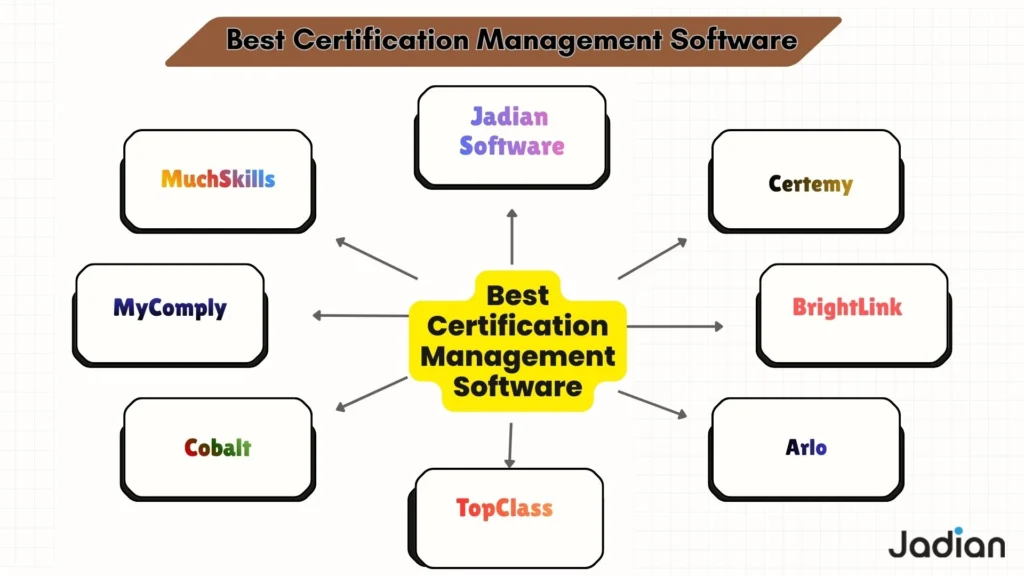
From the exhausting list of tools available online, we have specifically chosen the best one on the market. To help you find the best solution, here are some of the top certification management software tools you can use today.
Here, we explain their main features, list their pros and cons, and describe when each tool is most useful.
1. Jadian
Jadian is a complete platform for managing enterprise compliance and certification. This software has the ability to make it easier for certification bodies and organizations to manage accreditation, audits, inspections, and compliance.
This option works well for businesses looking for a simple and central way to handle certification, compliance, and quality tasks.
Key Features
- Automates your audits, inspections, and certification processes with streamlined workflows.
- Keeps all your data and compliance tracking in one central place.
- Monitors and reports in real time with easy-to-use dashboards.
- Access everything you need for field work right from your mobile device.
- Uses standardized templates for document control and reporting.
Pros
- Provides powerful automation and simple tools together to help you manage compliance tasks in one place.
- Designed to meet the needs of certification organizations and large companies.
- Allows you to adjust workflows easily so you can stay up to date when regulations change.
Cons
This tool may have more features than a small team needs. It could also take some work to set it up.
Best Use Cases
- Groups that are in charge of certification and accreditation
- Companies that have a lot of rules to follow
- Industries that are often checked and have changing regulations
2. Certemy
Certemy is a certification management software made for associations, licensing boards, and compliance teams. It automates certification applications, renewals, and tracks credentials. As a whole, this tool helps organizations in regulated industries handle complex credential requirements more easily.
Key Features
- Automates the steps in the certification procedure
- Keeps track of when certifications expire and handles renewals
- Checks credentials directly with the authority that issued them
- Makes compliance reports and dashboards
- Works with systems for managing people and running a business
Pros
- Offers strong tools that make it easier to follow the rules and speed up the verification process
- Adapts readily to address the requirements of professional organizations
- Effectively handles credentialing processes for big businesses
Cons
One significant problem with this program is that it costs a lot, which might be hard for smaller businesses. Also, setting up and customizing the software may take a lot of time.
Best Use Cases
- Boards that give out professional licenses
- Regulatory frameworks in healthcare and other fields
- Managing credentials across several states or at the national level
Read More >> Best Quality Management Software
3. BrightLink
BrightLink is another software platform that lets businesses manage every step of the certification process. This includes managing candidate applications, exams, providing credentials, and renewals.
Key Features
- Manage applications and candidate records in an efficient way.
- Put all of your exam and certification tracking in one place.
- Makes it easier to quickly give out digital badges and awards.
- Allow for unique workflows and make use of built-in compliance tools.
- Make sure the data is safe and make it easier to make reports.
Pros
- You can adjust the processes to meet your specific needs.
- The platform is designed to be easy to use and to give candidates a positive experience.
- It keeps your information safe and helps you meet requirements.
Cons
If you want to set up advanced workflows in this software, some training can help you get started. Moreover, some advanced features are only available as add-ons.
Best Use Cases
- Professional associations
- Certification program administrators
- Organizations that issue digital credentials
4. Arlo
Arlo is another tool that specializes in managing training and certifications. It helps professional organizations run courses, keep track of certifications, and manage renewals. Its many features make it a strong choice for programs that connect certification with learning.
Key Features
- Quickly make certificates and choose from a variety of pre-made templates.
- Get reminders sent to you automatically when it’s time to renew.
- In just a few seconds, you can check and validate licenses and certifications.
- Easily keep track of your training events and classes
- Get reports and keep your records in order for audits.
Pros
- Perfect for companies that wish to offer both training and certification in one spot
- It sends messages and reminders on its own to help everyone stay on track.
- It’s easy and clear how to handle certificate templates.
Cons
This tool is mostly for training providers, not for companies that solely do certifications. If you just need to track basic compliance, it may offer more features than you require.
Best Use Cases
- Training providers who are looking to become certified
- Schools and other educational institutions
- Certification steps related to a learning management system (LMS)
5. TopClass
TopClass is a learning management system (LMS) with strong certificate management features. It works well for professional groups and educational programs that want to offer classes and manage certifications in one place.
Key Features
- You can track certifications directly in your LMS tools with ease.
- Create and send certificates that are personalized for each learner.
- See reports and analytics dashboards to monitor progress.
- Manage credentials as your learners move forward in their courses.
- Provide dedicated portals for both members and learners.
Pros
- Brings together learning and certification features in a single platform.
- Works well for large organizations that support their members.
- Offers robust analytics and tools to monitor user engagement.
Cons
If your main goal is certification, most LMS platforms offer more features than you actually need. They also tend to cost more, which can be a drawback for smaller programs.
Best Use Cases
- Organizations that offer programs for professional growth
- Long training programs that focus on getting certified
- Businesses that need a full learning management system (LMS) and certification solution
There are a lot of choices, like Jadian Inc., which is made for training providers and professional groups. Each of these choices has its own strengths and weaknesses. Ultimately, the best tool for your business will depend on its size, industry, and compliance requirements.
Check each option’s features, how simple it is to use, and if it matches your needs. Pick one that helps you work better and can grow with your company.
Read More >> Best Food Safety Softwares
Bottom Line
Certification management software is the solution to your compliance needs. It helps organizations follow current regulations and remain compliant.
These platforms reduce paperwork and help organizations avoid expensive mistakes or unexpected audit issues. They help you manage certifications by storing your data in one place, renewing them automatically, and sending you quick updates.
To get started, simply begin by examining your organization’s unique certification challenges and compliance needs to find the best solution. The best certification management software should fit easily into your current processes. Consequently, you can spend less time on manual tracking and focus more on expanding your certification programs.
This shift builds trust and supports lasting value for organizations around the world.
FAQs
- What types of organizations use certification management software?
The software supports a wide range of organizations, including certification bodies and professional associations, Training providers, Regulated industries, and Businesses. This tool helps the management of certificates and qualifications for employees, partners, and customers more easily.
- Is certification management software the same as accreditation management software?
These two types of software are similar, but they are used for different things. Certification management software is mainly used to give out and keep track of certificates. Accreditation management software, on the other hand, helps businesses keep an eye on what they do, handle reviews, and follow government rules. Some platforms offer both types of features.
- Can certification software support multiple certification programs at once?
Yes, most modern certification software allows organizations to manage multiple certification programs at once. Each program can set its own rules, requirements, renewal periods, and progress tracking methods.
- How does certification management software support audits?
Certificate management software keeps all your records in one place, including important dates and times. It makes it easy to create audit reports, show you are following the rules, track past certifications, and share documents when needed.
- Can certification management software integrate with other systems?
Various software solutions connect with HR systems, training platforms, calendars, and reporting tools. This helps make tasks easier and reduces the need to enter data manually.
- Is certification management software suitable for small organizations?
Some platforms are built for big companies, but many certification software tools have flexible plans that are good for small teams. The best option depends on how complicated your certification needs are.